TWRP Recovery For Redmi K30 5G (Picasso)
TWRP is the most popular Custom Recovery in the Android community. If looking a custom recovery for your K30 5G phone then you should try this one. In this article, I will share TWRP Recovery K30 5G. And I will show you step by step how to install it.
Prerequirements
Before flashing the TWRP Recovery you need to unlock the bootloader of your K30 5G phone. After unlocking the bootloader of your K30 5G phone you can flash your favourite custom rom, custom recovery, or any custom modules you want.
So, make sure to unlock the bootloader before flashing the TWRP Recovery.
After unlocking the bootloader you can flash the TWRP Recovery using fastboot mode. For this you will need a Computer or Laptop.
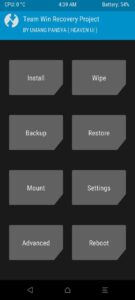
Screenshots:
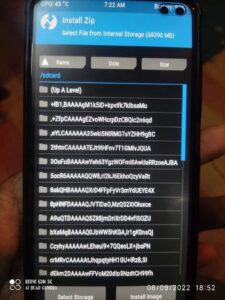
Changelog:
- Support Android 13 decryption.
- Fixed CPU temperature sensor
- Synchronization with source code
- Added support for MIUI firmware encryption on Android 11
- Fastbootd is activated
- Updated graphics
- Removal of the LogCat log
- Added a patch to prevent the replacement of TWRP by stock recovery
- Script for full conversion of /super to R/W partition (by brigudav)
- Script for mounting dynamic partitions in R/W (by brigudav)
- Script for disable forced encryption (by brigudav)
- Script for disable partition logging (by brigudav)
- Installation of a Magisk module to pass the SafetyNet test
How To Install TWRP Recovery in Redmi K30 5G (Picasso)
Now I will show you step by step procedure to flash and install the TWRP Recovery in your Redmi K30 5G.
Don’t miss any step otherwise you can be fail to install the custom recovery.
Note: If you make any mistake you can brick/damage your phone. So, proceed carefully. I suggest you to take help from any skilled person.
- At first get the platform tools from here. Then extract the file on your PC and open the platform tools folder.
- Press the Shift + Mouse Right Button at once. You will see option Open Powershell Window Here, Click on it.
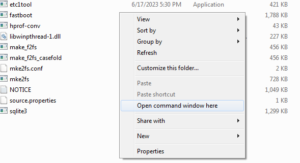
- Then boot your phone into fastboot mode by pressing and holding the Volume down + Power Button at once. And connect the phone with your PC using an USB Cable.
- Then check if the device connected and working properly by using this command: fastboot devices (hit enter button).
- If the device connected, you will see some random letters and numbers.
- Now get the TWRP Recovery from the following link. TWRP Recovery For K30 5G (Picasso).
- Then move the recovery.img file to the platform tools folder.
- Then go back to the command window and type the below command and hit the enter button.
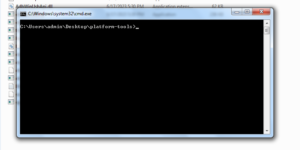
- fastboot flash recovery recovery.img
- After successful flash you can boot into the recovery mode by pressing and holding the Volume up and power button at once.
Related: Orange Fox Custom Recovery For K30 5G (Picasso)
Done. Congratulations you have successfully installed TWRP Recovery on your Redmi K30 5G (Picasso). Now you can install your favourite Custom Rom, Modules, Magisk on your phone also you can uninstall any system app by rooting your phone.
That’s all for today. Thank you for reading my post and visiting my website. If you have problem understanding this tutorial, please let me know in the comments below.