crDroid 9.5 For Redmi Note 11 Pro 5G (veux)
crDroid is an open source Android custom rom project. crDroid is based on the latest release of the LineageOS, so you will get latest Android updates as soon as it published by Google.
In this post, I will share crDroid 9.5 for the Xiaomi Redmi Note 11 Pro 5G. crDroid 9.5 is the latest release fron crDroid and it based on the Android 13. So, you will get top level of security from this Rom.
crDroid 9.5 Features
- Android 13
- Status Bar & Quick Settings Customization
- Lock screen Customization
- Navigation and buttons Customization
- User interface Customization
- Notifications and sounds Customization
- Miscellaneous and many more Customization
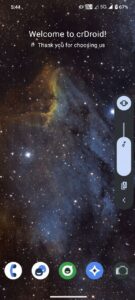
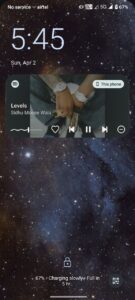
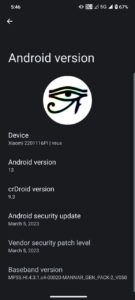
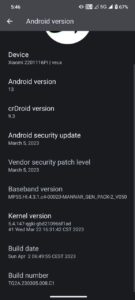
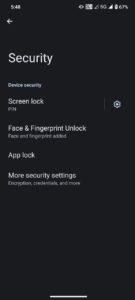
Screenshots:
Changelog:
- Latest Android security patch
- 90 fps support
- improved performance
Prerequirement:
Get the platform tools file. Then extract it on your PC. You will get a folder named Platform Tools, open this folder and proceed to the next steps below.
How To Install crDroid 9.5 Custom Rom on Redmi Note 11 Pro 5G
Before flashing any custom rom you will need to unlock the bootloader of your Redmi Note 11 Pro 5G phone. If you already unlocked and installed the TWRP Recovery then you can simply flash this rom using TWRP Recovery.
Related: TWRP Recovery For Redmi Note 11 Pro 5G (Veux/Peux)
But if you didn’t installed TWRP then follow the below steps to flash this rom properly.
- Get the crDroid 9.5 for Redmi Note 11 Pro 5G (veux) from this link. (Important: rename the file into crDroid.zip)
- Get these two files also: Boot img, Vendor_boot img.
- Move the crDroid Rom, boot.img and vendor_boot.img files to the platform tools folder.
- Now go to the platform tools folder and press Shift + Mouse Right Click at once. You will see option Open Powershell Window here. click on this option.
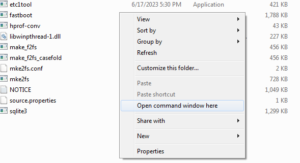
- Then it will open a command box here.
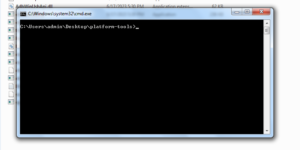
- Then boot your phone into fastboot mode by pressing and holding the Volume down and power button , at once. And connect the phone with your PC using an USB cable. (then give the below commands in the command box)
- fastboot set_active a
- fastboot flash boot_a boot.img
- fastboot flash boot_b boot.img
- fastboot flash vendor_boot_a vendor_boot.img
- fastboot flash vendor_boot_b vendor_boot.img
- Then reboot into recovery mode by pressing and holding the Volume up and power button, at once.
- Then go to Apply Update > Update Using ADB
- adb sideload crDroid.zip (give command in the command box)
- After getting the success message our Rom flashing is done. But Gapps (Google Apps) is not included with this rom, you will need to flash additional Gapps for this rom. You can get gapps for this rom from below link. Recommended Gapps for crDroid 9.5 Note 11 Pro 5G
- Then you can flash the gapps by following adb sideload method.
How To Flash Gapps in crDroid 9.5 Note 11 Pro 5G
- go to Apply Update > Update Using ADB
- then give this command in the command box: adb sideload gapps.zip
- After successful flashing you can reboot your phone into system and enjoy your newly installed Custom Rom.
Note: Make sure to rename the gapps file into gapps.zip and move the file to the platform tools folder.
Done. Congratulations you have successfully installed crDroid 9.5 custom rom based on Android 13 on your Redmi Note 11 Pro 5G.
The first reboot can take around 5-20 minutes. So, don’t worry just wait and enjoy your new AOSP based Android 13 Rom.
This tutorial is about Redmi Note 11 Pro 5G. You can follow this method to install this Rom on your, Redmi Note 11 Pro 5G, Redmi Note 11 Pro+ 5G, Redmi Note 11E Pro, Poco X4 Pro 5G.
Because all these devices contain the same code name “veux” “peux” and the board is also the same.
Related:
- PixelOS Android 13 Custom Rom For Note 11 Pro 5G
- Wave UI V2 For Note 11 Pro5G
- BananaDroid Android 13 Custom Rom For Redmi Note 11 Pro 5G
That’s all guys. Thank you for visiting my website. If you have problem understanding anything in this post, please let me know in the comments below.
Credits:
- Thanks to @Ramisky for base trees.
- Thanks to @WarriorKing11 and @andaspark, @chandrashekar_kun and @VigneshTN36 for testing.
- Thanks to @Anant_Goel for making this rom.