How To Root Redmi Note 11 Pro 5G (veux/peux)
If you want to get more advantage from your phone then rooting is the best option. By enabling root in your phone you can customoze your phone, remove system apps, install roms, unlock high fps in games and many more.
Today, in this post I will show you how to root Redmi Note 11 Pro 5G. The codename for this phone is: veux / peux.
What is Root?
Root is the process of gaining full control over your Android device.
This allows you to do things that you would not be able to do with a non-rooted device, such as:
- Install custom ROM
- Install custom kernel
- uninstall system apps
- flash cutom modules to unlock high fps in games
- Modify system settings and many more.
Rooting your Android device also has some risks, such as:
- Voiding your device’s warranty.
- Making your device more vulnerable to malware attacks.
- Damaging your device if you root it incorrectly.
Prerequirements
There are a few things you need to do before you can root your Redmi Note 11 Pro 5G.
The first thing is you need to unlock the bootloader in order to root your phone. If you already unlocked the bootloader then go ahead.
How To Root Redmi Note 11 Pro 5G
- Charge your phone more than 50%.
- install TWRP Recovery on your Redmi Note 11 Pro 5G.
- Get Magisk from Github official link.
- Now boot your phone into TWRP Recovery by pressing and holding the Volume down and power button at once. You will see interface like the picture below.
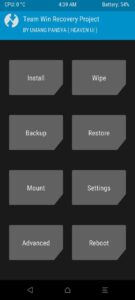
- Now click on Install. Then select the Magisk.zip file and swipe right to flash.
- After successful flash just reboot into system and you’re done.
Congratulations, you have successfully installed root on your Redmi Note 11 Pro 5G (veux / peux).
Now you can flash your favourite magisk modules, custom roms, uninstall system apps, increase fps in game and many more.
Compatible Devices:
You can Root any Android device by flashing magisk.zip file using custom recovery. But before flashing magisk.zip you will need to install a custom recovery (TWRP, Orange Fox, Pitch Black, etc) on your phone.
This tutorial is about Redmi Note 11 Pro 5G. You can follow this method to install Root on your, Redmi Note 11 Pro 5G, Redmi Note 11 Pro+ 5G, Redmi Note 11E Pro, Poco X4 Pro.
Because all these devices contain the same code name “veux” and the board is also the same.
I hope my tutorial helped you to install Magisk and root on your Redmi Note 11 Pro 5G. If you have any problem understanding anything in this post, please let me know in the comment. I will be happy to help you.